1. Use the "Convertitore di marcatori" to convert a CSV file into a CSV file
Open the free Convertitore di marcatori, select "CSV" and set "convert" to "CSV for Google Sheets". Generate and download the file. Se hai problemi a convertire il file, puoi contattare il supporto gratuito.
Ensure that the CSV file contains columns labelled "Timecode In", "Name" and "Comment". Otherwise, it will not work. You can also add columns for 'Colour' and 'Timecode Out'.
2. Import the CSV file into Google Sheets
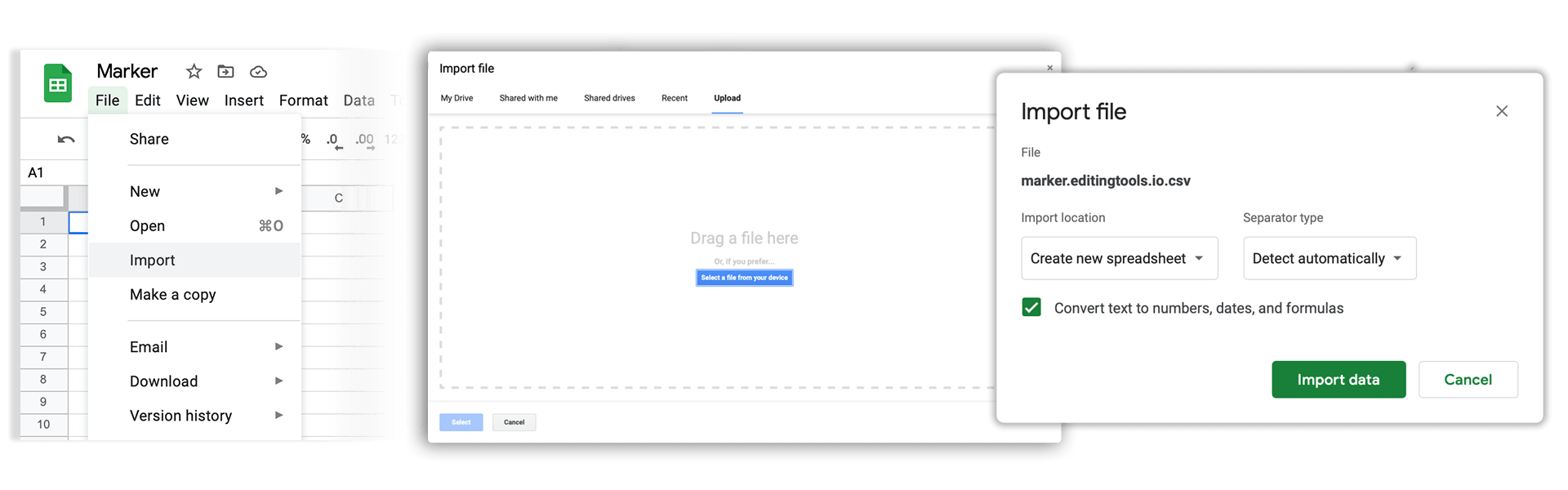
Open Google Sheets and go to "File -> Import". Upload the generated CSV file and press "Import Data" to generate the Sheet with all markers.
🚀 Fatto
Per ora è tutto! Se hai trovato utile questo tutorial, condividilo per sostenerci. Se hai suggerimenti su come migliorare il flusso di lavoro, faccelo sapere!