Teleport

Teleport

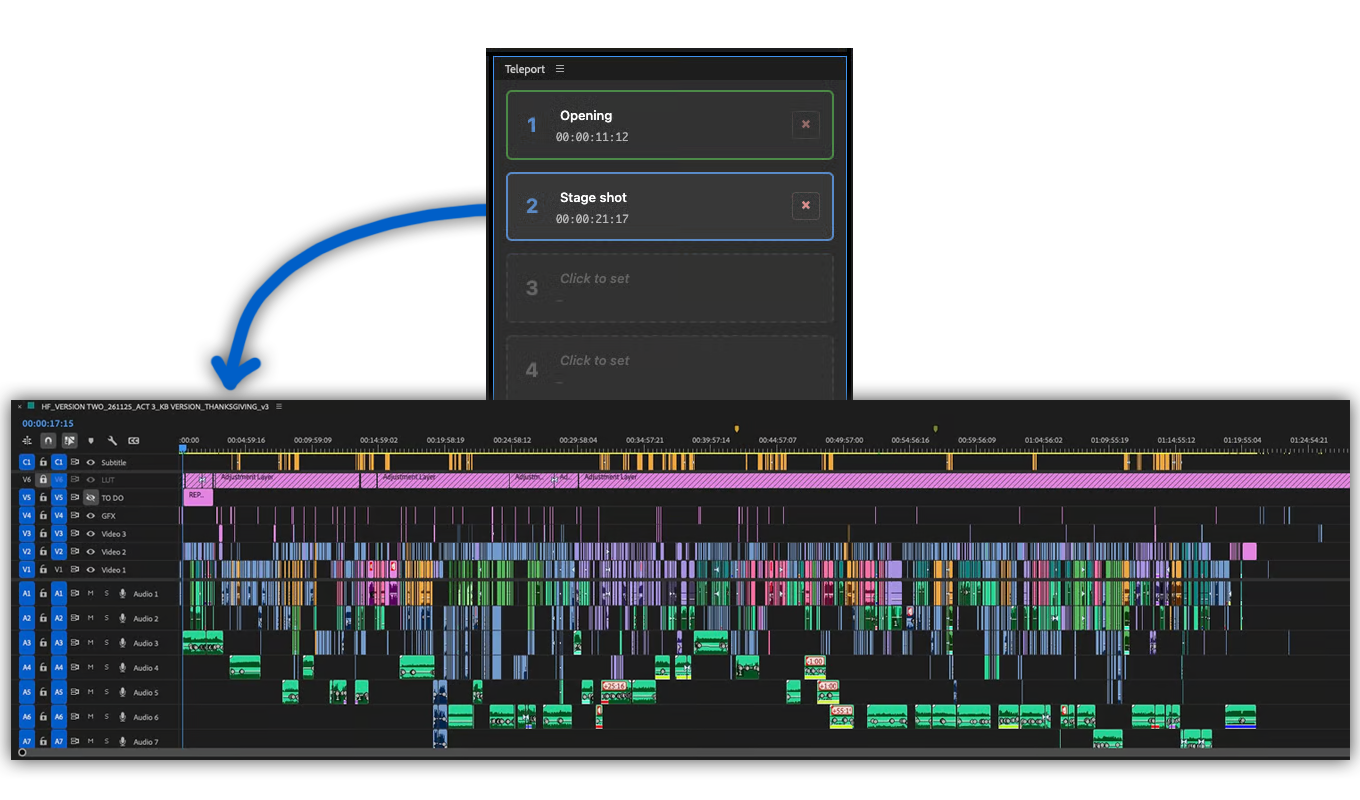
If you've ever worked with a director who wants to quickly grab a shot from scene two and move it to scene twelve, then you know what to do. You have to zoom out, scroll across a lot of clips to find the shot, move it, and then...where was I again? The Teleport plugin for Premiere Pro solves this issue.
Caratteristiche

  • Quickly jump around in your sequence.
  • Store up to five different locations
  • Reset the stored anchors easily
  • Supports clips and sequence anchors
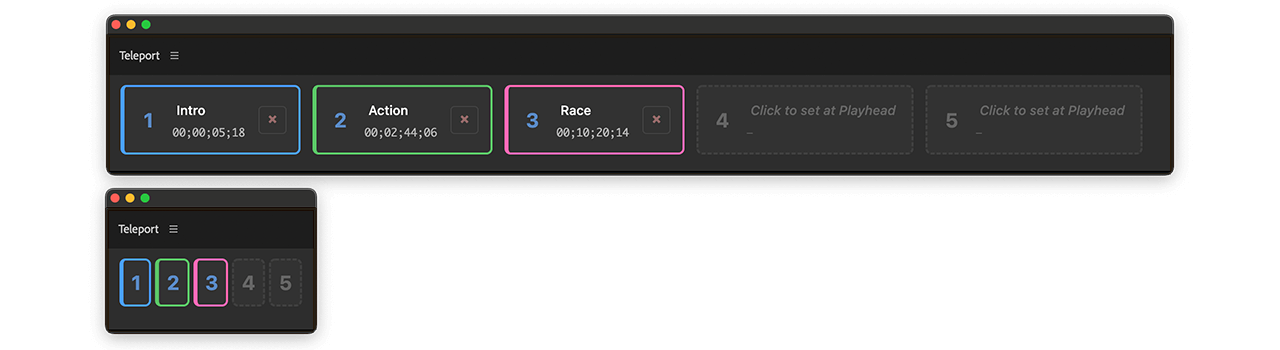
  • Five different panel view options
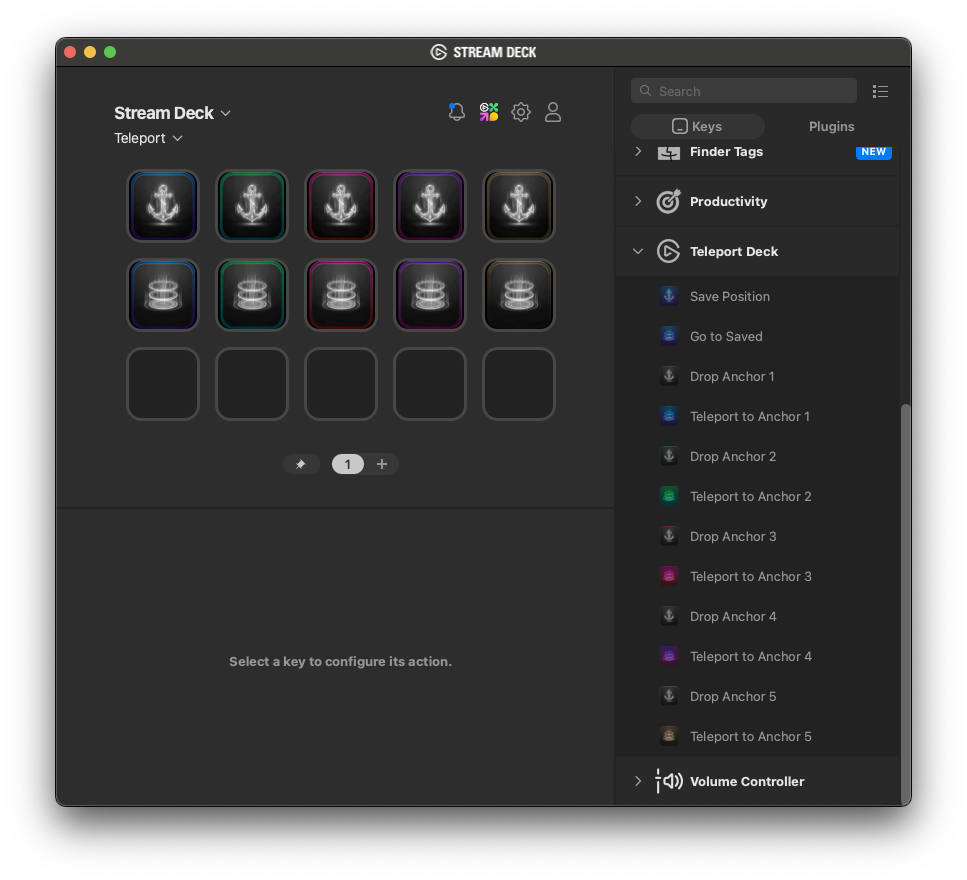
  • Elgato Stream Deck support

per Adobe Premiere CC 2022+
Per Windows e MacOS.

No more searching!

Teleport lets you drop a digital anchor anywhere in your timeline, allowing you to instantly jump back to that exact frame. No more searching for colored markers or memorizing timecodes!

How it works:

  1. Click to record your playhead’s current timecode.
  2. Give it a label such as "Scene 4 Bridge" or "Interview Alt".
  3. Navigate to another part of your project or timeline.
  4. Click the button to instantly return to your original spot.

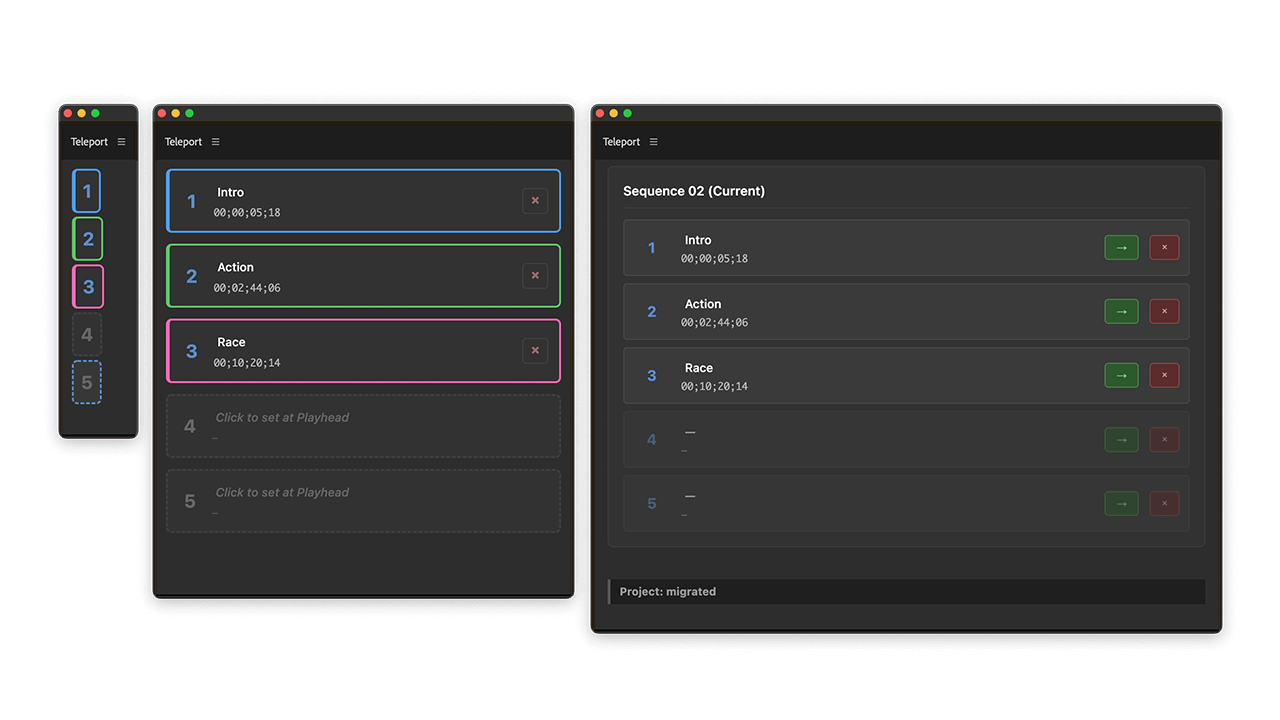
Make the plugin panel tiny!

You can choose in between five different panel modes:

  1. Vertical
  2. Horizontal
  3. Tiny Vertical
  4. Tiny Horizontal
  5. All Timelines

Works across multiple sequences

The "All timelines" view allows you to see all the anchors across your different project sequences, and enables you to easily jump to a position in other sequences.

Use Teleport with Stream Deck

Download and install the Teleport Stream Deck add-on by opening the file with Stream Deck. Then, drag and drop the Anchor and Teleport buttons into your desired positions in the layout. You are now ready to start using the plugin.

Scegli la tua licenza

We offer three types of licenses. The single-user license is ideal for freelancers who want to use the software on one or two computers. This license is tied to a single account. For companies, we offer a team license, which is bound to the company. The number of licenses can be chosen upon purchase, with a minimum of three licenses. We also offer an enterprise option. Please contact our sales team for more information. All licenses are perpetual.

Ti consigliamo di accedere prima di effettuare un acquisto, così potrai accedere facilmente ai futuri aggiornamenti del plugin.
Licenza per utente singolo
loading...
Team License (3+ users)
loading...
Le licenze per utente singolo possono essere acquistate anche dall'Adobe Exchange Store.
Contatta il nostro team vendite per una licenza Enterprise.

Nota bene: il plugin è attualmente disponibile solo in inglese.

Verrai reindirizzato al checkout sicuro di «Paddle». Paddle.com è il Merchant of Record.

Inversione contabile (reverse charge): Se acquisti per un'azienda e hai una partita IVA, in alcuni paesi potresti poter usare la procedura di inversione contabile (reverse charge). Nella pagina di pagamento, dopo aver selezionato il paese e il codice postale, clicca a sinistra su "Add VAT ID".

Le Business Team License non possono essere acquistate tramite l'Adobe Exchange Store.

Supporto

Se hai domande o richieste di funzionalità, contatta il nostro team di assistenza. Saremo lieti di assisterti!

DOMANDE FREQUENTI

To install the plugin, use an ZXP Installer like ZXP Installer from AE Scripts or Anastasiy Extension Manager. These installers are free.

If you already have the plugin installed and want to install a new version of the plugin, you can simply run the new installer. It is not necessary to uninstall the old version, the new one will overwrite everything.

You can activate the plugin panel in Premiere Pro menu under "Window > Extensions > Teleport".

Download and install the Stream Deck add-on to your Stream Deck application. Then, drag and drop the Anchor and Teleport buttons into their desired positions in the layout. If set up correctly, it should work instantly with the Premiere Pro panel.

If no clip is selected in the Timeline when you drop an anchor, Teleport will record the current timecode at the playhead's position.This will teleport you back to the same sequence timecode location each time.

If a clip is selected, the source timecode and clip name will be stored in the anchor. You will then be teleported back to that position within the clip, no matter where it has been moved in the timeline. If the clip has been deleted, Teleport will issue a warning. If the clip has been trimmed to remove the anchor timecode from the sequence, Teleport will take you to the first frame of the clip.

All anchors are sequence-specific, even if you rename the sequence because Teleport uses Premiere's internal ID system.

Yes. It also works on air-gapped systems.

No, i tuoi dati restano sul tuo computer.

Sì. Il plugin è stato progettato per supportare qualsiasi tipo di progetto, comprese le produzioni con forti restrizioni e NDA firmati. Non condivide alcun dato con dispositivi diversi dal tuo.

Chiudi e riapri il pannello: in questo modo il plugin dovrebbe ricaricarsi e il problema risolversi. Se non funziona, prova a riavviare Premiere o a reinstallare l'ultimo aggiornamento del plugin.

Lo abbiamo testato su Premiere 2021, 2022 e 2023. Anche le versioni precedenti potrebbero funzionare, ma al momento non possiamo garantirlo. Se utilizzi una versione precedente di Premiere, facci sapere com'è la tua esperienza.

Il plugin è stato scritto per Windows 10 e MacOS 12 (Montery). Per il momento non sono escluse altre versioni, ma non possiamo escludere problemi di prova con le versioni precedenti. Se utilizzi un sistema operativo più vecchio, facci sapere com'è la tua esperienza.

Se hai acquistato il plugin senza creare un account, ci sono due modi per scaricare un aggiornamento o riscaricare il plugin. L'opzione più rapida è creare un account gratuito con l'indirizzo e-mail associato all'acquisto. La licenza acquistata verrà collegata automaticamente al tuo account. Dopo aver effettuato l'accesso, trovi il plugin in Acquisti e puoi scaricarlo di nuovo. Se non vedi il tuo plugin, clicca su "Ricollega acquisti". Tieni presente che un plugin può essere ricollegato automaticamente solo se viene usato lo stesso indirizzo e-mail. Un'altra opzione è contattare il nostro team di supporto e richiedere un nuovo link di download. Questa procedura, però, può richiedere un po' di tempo.

Se ti serve una nuova funzione, un'opzione o una versione personalizzata del plugin, inviaci un messaggio. Offriamo soluzioni personalizzate per le aziende.

On Windows the extension can be easily uninstalled under "Add/Remove Programs".

On MacOS the extension can be easily uninstalled by deleting the folder "/Library/Application Support/Adobe/CEP/extensions/Teleport".